Excel Glass Firing Calculator
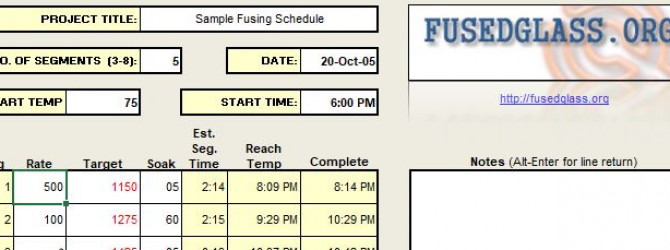
At the bottom of this page is a link to a Microsoft Excel spreadsheet for your kiln-glass firing schedules. 
Using this tool, you can: - Plan your schedule segments (ramps and holds)
- Estimate how long each segment will take
- Estimate when a segment will reach a target temperature
- Estimate the total time for the entire firing
- Add notes and pictures
The schedule automatically recognizes if you enter a temperature rate change (*ramp) that exceeds what the kiln can achieve (based on the values you enter on the "Max Ramp" tab). If you enter an unachievable rate (up or down), the schedule will highlight the cell in orange AND use the maximum possible rate to determine segment duration. This should yield considerably better estimations for segment and schedule completion times. Best of all, this spreadsheet is free. It requires that you own or have access to Microsoft Excel.
BY DOWNLOADING THIS SOFTWARE YOU AGREE TO THE FOLLOWING: This software is provided "as is", without warranty, and with all faults. This software is intended to estimate firing schedules and may, through a lack of precision and/or due to defect, provide grossly inaccurate data. You are ultimately responsible for determining your firing schedule. Kilns should never be left to run unattended. |
|
|
Problems Using Spreadsheet
I think this is a very usefull tool but am having some trouble in using the Max Ramp portion of the spreadsheet. If I understand the spreadsheet instructions correctly, I should tailor this screen to match my kilns behaviour. The instructions say to enter "1000 in cell B6" , however cell B6 is a locked cell, as it appears are all of the cells showing black values. Am I understanding this incorrectly or is there an error in the spreadsheet?
How about a spot to add a
How about a spot to add a picture (maybe even before and after) of the glass. There's plenty ogf room on ther even for it to print out on an 8.5x11.
Steve Worcester
WWW.TURNINGWOOD.COM
Now it's April 2010. Was
Now it's April 2010. Was there ever an answer to this post. I too find the explanation of MAX ramp rate confusing & the sheet is Locked so no entry is allowed. Maybe it just a look up so eg if your kiln is at 700 the max up ramp is 1300 & down 220. That kind of makes sense but is it right?
excel tool
I'm sorry, but I must be stupid. How do you open the spread sheet? Any of the files I click on open a web page with HTML code. I do have excel (2010). I tried every thing. Well, not everything or I would have gotten the thing to work!!
Thanks,
K. George
Excel sheet
I am at a loss to help without a bit more explanation.
1st with I will assume you have downloaded the right file There are 2 versions. One for the very old Excel & the one on the right for most Excels after 2004 or thereabouts.
2nd If you have the file in your downloads folder & have it should open in Excel without trouble.
I have a feeling if you have an HTML file then you are not downloading the right thing. The right hand download is file called glass_firing_schedule.xlsx. Note the file extension its Excel's file extension. If you do not have that or an xls file you have not downloaded the right thing. When replying I cannot see the download page so this is from memory
Reply #2
Below is the download for the Firing Schedule spreadsheet. Clicking on Version for MS Excel 2007 downloads an xlxs file. The one on the left an xls file. Frankly the 2007 one can be opened with most any of the Excel progs. Please tell me what the exact name of the file is you have downloaded.
Thnx
Version for MS Excel
Versions 97 - 2003
Version for MS Excel
Versions 2007
Excel Firing Calculator
I agree with the other posts -- there is not a useable Excel.xls file in the extractions. Could you provide an updated extraction and let me know when it is available. Thanks. Patricia
My excel firing calculator download works well
I just downloaded the 2003 version and it works well. I have a 2008 Acer IBM with Vista and a 2003 Microsoft Office program. I tried the 2007 version first, but it could not be editednwith my excel program. You can post pictures with the 2003 version, too. See the bottom of the sheet and click the photos tab. Hope this helps.
Cynthia Ann Swan, Terra Pax Studio, Los Angeles, CA
excel firing calculator download
I just posted this in the general forum, but wanted to be sure you saw it. Hope it works for you, too!
I just downloaded the 2003 version and it works well. I have a 2008 Acer IBM with Vista and a 2003 Microsoft Office program. I tried the 2007 version first, but it could not be edited with my excel program. You can post pictures with the 2003 version, too. See the bottom of the sheet and click the photos tab. Hope this helps.
Cynthia Ann Swan, Terra Pax Studio, Los Angeles, CA
